How to redeem Beyond Nen codes if I am already in game?
Open Customize on the left, paste one Code cell into the box on the right, and press Redeem. Stay in Place 6016716328.

How to redeem Beyond Nen codes in Customize: left button, right-side code box, paste one string, tap Redeem. Not roblox.com/redeem. Place 6016716328.
Customize left, code box right.
~10 min read
How to redeem Beyond Nen codes: join Place 6016716328 (Beyond Nen by Beyond Nen), open Customize on the left of the HUD, paste one string into the code box on the right (labeled CODES or ENTER CODE), then press Redeem. This is not roblox.com/redeem. Play on Roblox.
Checked November 8, 2026. THANKYOU! and RELEASE! appear on multiple named recaps. PATCH1! and UPDATECOMING appear only on MrGuider — treat a reject as expired. Codes are case-sensitive and usually once per account. The strings themselves live on the codes table. This page is only the click path, the paste rules, and what a reject means. Last checked November 2026.
| Fact | Detail |
|---|---|
| Place | 6016716328 |
| Universe | 2174306620 |
| Creator | Beyond Nen |
| Where | Customize, left side of the HUD |
| Field | Right side — CODES / ENTER CODE |
| Button | Redeem, once per string |
| Case | Sensitive, including the trailing ! |
| Website | Do not use roblox.com/redeem |
| Device | PC, console, and mobile share the experience |
| Verified | November 8, 2026 |
Matched by build plan, shared topics, and guide progression — not random related links.
How to redeem Beyond Nen codes only works inside Place 6016716328, universe 2174306620, published by Beyond Nen. Load that experience and stay in it. A browser tab, a catalog page, or a different action RPG with a similar name will not grant Spins for these strings.
Check the title before the first paste. If a friend sent a screenshot from another game, the code box you are about to open is the wrong one even when the letters look familiar. Play on Roblox.
Roblox search returns other experiences, script videos, and lookalike “codes” lists for the same words. This walkthrough is Place 6016716328 only. Strings that never appear on the codes table are not part of how to redeem Beyond Nen codes.
Redeeming is optional. Whale Island quests start either way. Codes add Spins so the first race and lineage decision is cheaper. If the box is missing for a minute because a tutorial covers the HUD, finish or skip that prompt, then look again. Do not install a menu from outside the game.
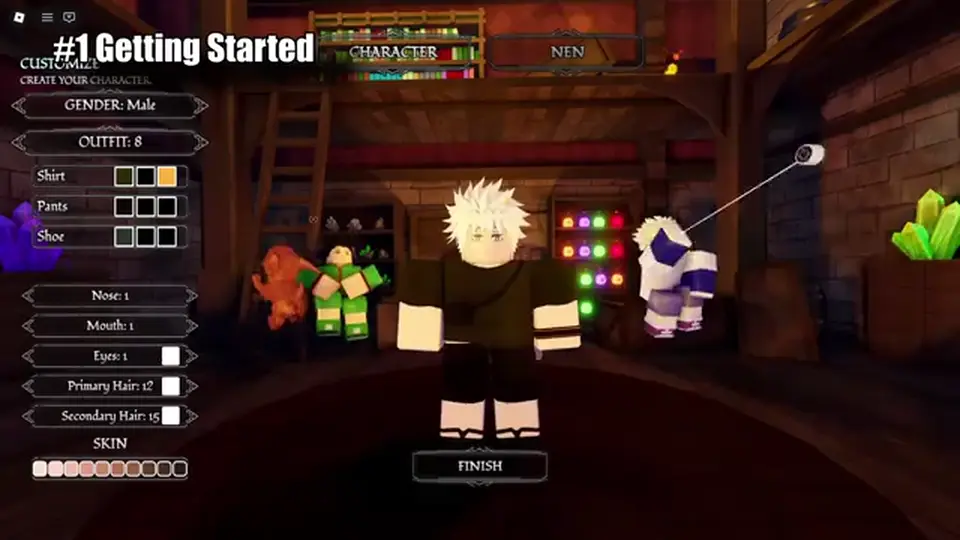
Open Customize on the left side of the HUD. The code box sits on the right, labeled CODES or ENTER CODE. You are not looking for a chat slash command, a loading-screen tweet button, or a shop gear copied from another experience. Public walkthroughs show this same Customize screen on the first join, when you also spin race.
Beyond Nen redeem codes never go through roblox.com/redeem. If the page in front of you is a website form with a green Roblox header, you left the experience.
| Guess | Is it this game? | Do this |
|---|---|---|
| Customize on the left | Yes — the documented path | Open it, then find the right-side box |
| CODES / ENTER CODE on the right | Yes | Paste one string and Redeem |
| Race spin on the same screen | Yes — that spends Spins | Redeem first, spin after |
| roblox.com/redeem | No | Close the tab and rejoin the Place |
| Chat command | Not listed | Do not type the string in chat |
| M-menu shop from a different game | Not the documented path | Use Customize. Do not import another HUD |
Customize is where you paste and where you spend. The code box grants Spins. The race and lineage controls spend them. Do not spin first and then discover you pasted the reward sentence into the field. Order is paste, Redeem, read the grant, then spin.
Use this order for every string, including the two Unverified rows. How to redeem Beyond Nen codes is the same four beats whether the status is Active or not. The status only changes how you react when Redeem refuses.
| Step | Success looks like | Fail looks like |
|---|---|---|
| Join the Place | Beyond Nen by Beyond Nen | A different experience or a browser tab |
| Open Customize | Left HUD button, character options visible | A website promocode form |
| Find the box | Right side, CODES or ENTER CODE | The chat window or a shop from another game |
| Paste one string | The Code cell and nothing else | Two codes at once, or the reward words |
| Redeem | A Spins grant (RELEASE! may also show a Reset Orb) | Invalid, already used, or silence |
Paste THANKYOU! and Redeem. Clear the field. Paste RELEASE! and Redeem. Then decide whether PATCH1! and UPDATECOMING are worth a single Unverified try. Never concatenate them. The field is one code wide.
Multi-source recaps pay 10 Spins on THANKYOU! and 10 Spins on RELEASE!. GameRant also lists 1 Reset Orb on RELEASE!. If you only see Spins, the redeem still worked. Do not press Redeem again on the same string. Full reward notes: Beyond Nen codes.
Paste the Code cell only. The working Active strings are THANKYOU! and RELEASE!. Both end with an exclamation mark, and both are uppercase. PATCH1! also ends with !. UPDATECOMING is uppercase and has no exclamation mark. The reward column (“10 Spins”) is not part of the paste.
| Paste this | Do not paste | Why |
|---|---|---|
| THANKYOU! | thankyou, THANKYOU, THANK YOU! | Case and the ! are the string |
| RELEASE! | RELEASE, release!, [RELEASE!] | The listing title is not the code |
| PATCH1! | PATCH1, patch 1 | Unverified, but the mark is still required if you try it |
| UPDATECOMING | UPDATECOMING!, update coming | No mark, no space — Unverified |
| (nothing extra) | “10 Spins” or “Reset Orb” | Those words are the reward, not the code |
The codes table Copy button writes the cell to your clipboard without a trailing space. Retyping is how the ! disappears. If you copied from chat instead, delete any space or line break at the end before Redeem.
The Roblox listing is styled with a release tag in the title. That label is not a second way to type RELEASE!. Use the Code cell. How to redeem Beyond Nen codes never means “paste the page title.”
Read the message, change one thing, and stop. Hammering Redeem does not wear the server down into accepting a bad paste. These checks cover the rejects players actually hit on the first day.
| Message or result | Meaning | Next action |
|---|---|---|
| Invalid / expired | Wrong characters, or the string is dead | Recopy. If it is PATCH1! or UPDATECOMING, stop |
| Already redeemed | This account already took it | Next string. Do not make another account for this wiki’s advice |
| Spins increased | Success | Clear the field and paste the next code |
| Spins plus a Reset Orb | Matches the GameRant note on RELEASE! | Still a success. Do not repeat |
| No message at all | Wrong UI — website, chat, or a covered button | Reopen Customize and press Redeem once |
PATCH1! and UPDATECOMING are MrGuider-only as of November 2026. A reject does not mean your client is broken and does not mean THANKYOU! is fake. It means that row was never cross-checked. Leave the status as Unverified.
If THANKYOU! fails, the usual miss is a missing ! or a lower-case letter, not a region lock. Copy again from the table. Beyond Nen redeem codes are case-sensitive on purpose.
The experience is listed for PC, console, and mobile, and how to redeem Beyond Nen codes uses the same Customize control on each as long as you are inside Place 6016716328. On a touch screen, tap Customize on the left, then the right-side field, then Redeem. This page does not invent a controller glyph or a three-dot menu that the HUD has not shown.
The website is the one hard no. roblox.com/redeem spends catalog promocodes. It does not talk to this code box. Pasting THANKYOU! there will not add Spins.
Copy on the codes page, switch to the Roblox app, open Customize, and long-press the field to paste. If the paste arrives with a space, backspace once. The ! still has to be the last character on THANKYOU!, RELEASE!, and PATCH1!.
Open Customize with whatever button focuses the left HUD on your pad. The field is still the right-side code box. Do not go to the console browser for a promocode page. If the on-screen keyboard hides the Redeem button, close the keyboard and press Redeem after the string is visible.
Spend Spins on race and lineage first. Public walkthroughs name Human, Rabbit, Cat, Cyborg, and Celestial, and they treat Celestial as the rare race. Lineage perks that recaps actually name are Zoldyck, Kurta, and Freecss, with an evolution around level 30. Other clan names are still TBA. Leave some Spins if you care about affinity or a Hatsu later — Nen itself is locked behind the Hunter Exam and Rohan, so an early ability roll is not a power spike today.
Then close the box. Whale Island quests and the exam queue do not need another code. Watch discord.gg/beyondnen (Discord) for the next string instead of refreshing random lists.
A missing Reset Orb on RELEASE! is the GameRant conflict, not a failed redeem. Pro Game Guides lists 10 Spins and stops there. Your next session is the island, not a second paste.
Copy the live rows on Beyond Nen codes before you paste again.
Join Discord at discord.gg/beyondnen so the next string is not a guess.
Put the Spins to work in the beginner guide, then read races and lineages before you empty the counter.
Open Customize on the left, paste one Code cell into the box on the right, and press Redeem. Stay in Place 6016716328.
No. Beyond Nen codes are in-experience only. The website form is for catalog promocodes.
Yes for THANKYOU!, RELEASE!, and PATCH1!. UPDATECOMING has no exclamation mark. Copy the cell so you do not add or drop it.
Recopy from the codes table. Check the !, spaces, and that you are in Place 6016716328. An Unverified row can simply be dead.
Yes, inside the Roblox app. Tap Customize on the left, paste into the right-side box, and tap Redeem. Do not open the website form.
Race and lineage. Save a remainder for affinity and Hatsu until you can use Nen. Start with the beginner guide.
November 8, 2026. Checked November 8, 2026. THANKYOU! and RELEASE! appear on multiple named recaps. PATCH1! and UPDATECOMING appear only on MrGuider — treat a reject as expired. Codes are case-sensitive and usually once per account.
Matched by build plan, shared topics, and guide progression — not random related links.